
Sharing Spaces: Making Locations Available Across Studies
Published August 20, 2026
NOTE: This feature is only available with Advanced editions or above
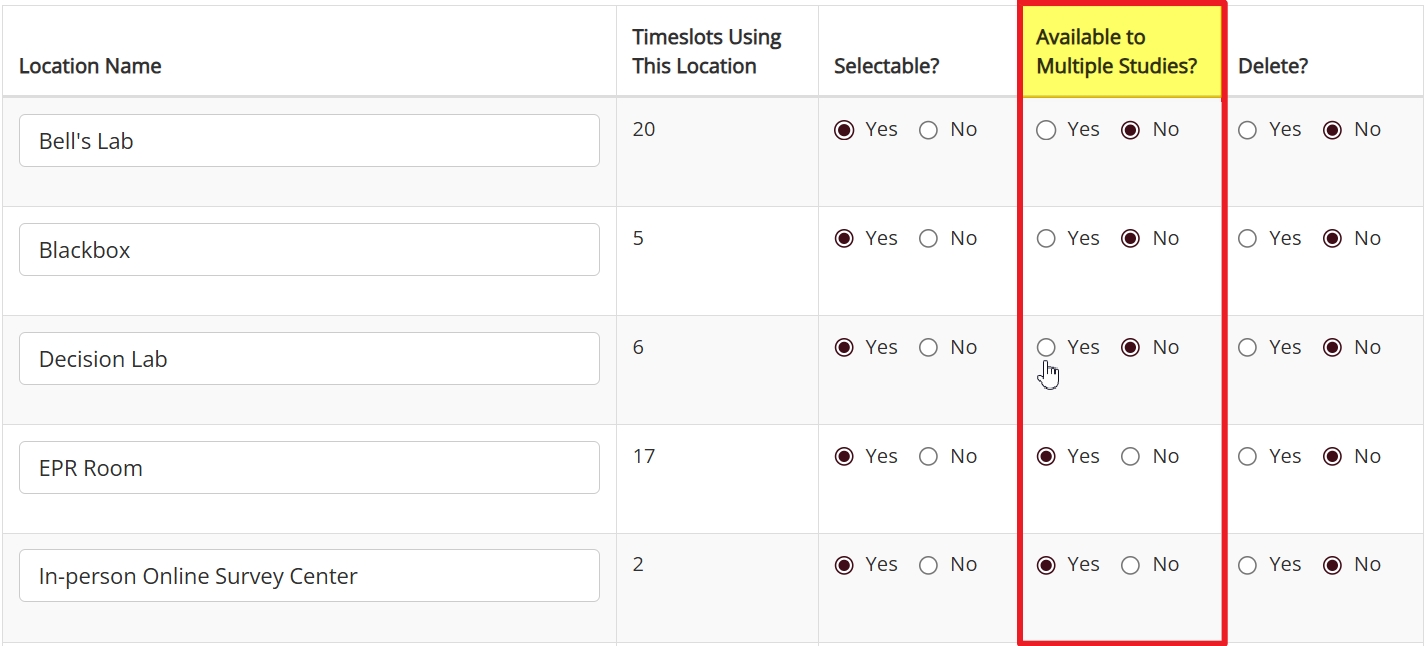
Shared Locations in a Nutshell
What is it?
Shared locations allow researchers to schedule timeslots using the same location. The researcher who gets the first sign-up gets to make use of that location.
Shared locations can provide other benefits, such as more efficient use of space, in addition to solving potential scheduling problems.
How does it work?
Administrators can make any location found on the Location Listings page a shared location by selecting “Yes” to the “Available to Multiple Studies?” option.
The difference between non-shared and shared locations is in how the system determines which timeslot gets to use the location during a specific time window. If a location isn’t shared, the system reserves it exclusively for the first researcher to add a timeslot using the location (first come, first serve).
If a location is a shared location, the system allows multiple timeslots that begin and end at the same time to reserve the location for that time window. However, once a participant signs up for one of these timeslots, that timeslot becomes permanent (i.e., participants can no longer sign up for other timeslots that use this time window and location).
When should I use it?
The shared location option is specifically designed for locations with high demand and/or limited availability. If researchers are competing to be the first to reserve time in a location, you want to be sure that this time is used well. Because actual signups determine which study’s timeslot remains available, using shared locations ensures valuable resources aren’t wasted.
For details, examples, and more, please see below.
Adding and Filling Timeslots with and without Shared Locations
The best way to understand the difference is to contrast the way the system handles a scheduling conflict with a shared location vs. other listed locations. To make this contrast clearer, we’ve provided a side-by-side comparison of essentially the same process using both location types. Both versions start with a researcher trying to add a timeslot to their study when the time and location they want is already reserved, and both versions end with how location type changes the way participant signups work:
A Scheduling Conflict without a Shared Location
A Scheduling Conflict with a Shared Location
Different Ways to Deal with Double-Booking
The side-by-side comparison above provides a quick overview of how the system handles scheduling conflicts with timeslots using shared locations vs. timeslots using other locations. Now it’s time to get into a bit more detail.
If a location is a shared location, researchers can add a timeslot using this location to different studies providing that the start and end times match.
That doesn’t mean different researchers will actually end up using the shared location during the same time window. The system will still resolve the scheduling conflict automatically. It’s just a matter of when this happens and why.
A regular (i.e., “non-shared”) location is reserved as soon as a researcher adds a timeslot to their study using this location. With shared locations, multiple timeslots co-exist so long as no participants have signed up for any of them.
To make this more concrete, imagine a time window on a specific day: 9AM to 10AM on Wednesday. Multiple timeslots using this time period and using the same shared location can be added to different studies. So, for example, five researchers conducting five different studies can all add timeslots to their individual studies using this 9AM to 10AM time window AND the same shared location. However, at most only one of these researchers will actually get the reservation for the shared location during this time window (the only other possible outcome is that no researchers get to use the location, and this only happens if no participants sign up for any of the five timeslots).
The point is that, although there can be multiple timeslots using the same shared location for the same time window, ultimately there will be only one. As soon as one of these timeslots has a signup, the other timeslots will no longer be available.
The above provides a basic description of how shared locations work. To better understand both the basics and beyond, however, we need an example.
How it Works: An Illustration by Example
To start our example, let us introduce two researchers: Alice and Bob. Both work out of the same institute and, while they do occasionally collaborate (indeed, both sometimes quite famously, and sometimes with the famous!), for the most part each conducts studies independently of the other.
At the moment, these two researchers are each in the final stages of setting up a study in Sona. Alice’s study is Study Alpha, while Bob’s study is “Fun and Games for Fun and Profit”. Both are active and approved, and our two researchers are each in the process of adding timeslots to their respective studies.
This should all be familiar territory. We’ll briefly remain on familiar grounds, because we want to compare (now using this example) how scheduling works with both non-shared and shared locations.
Non-Shared Locations: Sharing a location without using a Shared location:
Alice and Bob are both trying to reserve a highly sought-after location for early November. At the moment, they are both interested in reserving time in Observance Lab 1 for 11AM on November 5th. It just so happens that Alice adds her timeslot first. Thus, when Bob attempts to add a timeslot to his study for the same time on the same day, he receives the following message:

It’s first come, first serve, and Alice got there first. When Bob tries to add his timeslot, the system checks availability, sees that the location is reserved by Alice, and prevents Bob from adding his timeslot.
Sometime later, participants begin checking their accounts for available studies and looking at available times for those studies they find interesting. Many participants click on the study “Fun and Games for Fun and Profit” to view additional details before checking for available times. Many sign up for this study, and there are more participants who want to sign up than there are available timeslots.
Very few participants click on Study Alpha, which isn’t surprising given the study name and the fact that the description reads: “This is a Study. It is for research.” Even fewer participants bother to look at available times.
Importantly, only those few participants who do bother to look at timeslots for study Alpha will ever see the one reserving Observance Lab 1 on November 5th. None of them sign up for it, though. This wouldn’t be as big of a deal were it not for the fact that Bob, who was somewhat slower adding timeslots, has no more timeslots available and the lab location he needs is completely booked.
Thus, on November 5th at 11AM, Observance Lab 1 is empty, despite Bob’s need for the location and in spite of it being available to participants (if only they had elected to participate in Alice’s study).
This is what can happen when researchers share a location, but without it being a shared location (i.e., without “Available to Multiple Studies?” enabled). We’re now going to go back in time and repeat the same process. This time, however, we’ll make Observance Lab 1 a shared location.
Shared Location Advantages
What follows will be essentially the same series of events as above, but with one small, important change: Observance Lab 1 is now a shared location. Everything proceeds as it did previously right up until the moment Bob tries to add a timeslot. As before, both Alice and Bob want to reserve Observance Lab 1 for 11AM on November 5th and (also as before), Alice got there first. This time, though, when Bob tries to add his timeslot, the system sees a scheduling conflict, but it also sees that the location can be shared across studies.
Next (and this is important!), the system checks to make sure that the time period Bob is trying to reserve starts and ends at the same time as Alice’s. If one study runs longer, then the system will treat this as a scheduling conflict.
Luckily, both Alice’s and Bob’s timeslots are for one hour, so the system allows Bob to add this timeslot to his study.
Time goes by (as it often does, at roughly a rate of one second per second), and once more participants log in to their accounts. This time, participants who click on Bob’s study and check for timeslots will see the one for 11AM November 5th in Observance Lab 1. The same is still true (at least initially) for participants who check the timeslots for Study Alpha.
Now, however, as soon as a participant signs up for Bob’s study (because, let’s be honest, they’re not going to sign up for Study Alpha), and picks the timeslot using the shared location, Alice’s timeslot for November 5th at 11AM will no longer be available to participants.
Participants can still sign up for Bob’s timeslot for 11AM on November 5th until all available slots fill up.
The important point, and the main takeaway for this part of the example, is that because a participant signed up for Bob’s timeslot first, he gets the reservation.
Turning Cancellations into Opportunities
It gets better, however. Let’s suppose someone signs up for Bob’s study, but then cancels. Does this mean we’re back to wasting valuable resources? No. Instead, the system removes the hold that prevents any participants from signing up for other studies’ timeslots that use Observation Lab 1 on November 5th at 11AM.
More generally, if a shared location has a sign-up and the participant cancels, the system will once again open up use of the shared location to timeslots during that same window. You can think of it as a canceled reservation at a hotel. If it’s canceled, the hotel isn’t going to continue to make sure nobody else can use the room.
Generalizing the Example
The above example illustrates how shared locations work, but it is simplistic. It revolves around only two researchers competing for use of one location during a single time window. While the example’s simplicity makes it easier to follow, it will be useful to illustrate some other ways of thinking about shared locations and how they can benefit you.
One starting point is to think beyond a single block of time while continuing to consider a single location. To make this more realistic, you can imagine a location that multiple research groups use, e.g., an fMRI lab.
When equipment can’t be moved from a lab, and time in the lab is a scarce but much desired commodity, a standard approach is to have sign-up lists. This typically requires researchers to book far in advance. It often favors certain researchers who are better able to plan that far ahead, while putting other researchers at a disadvantage simply because they can’t complete all the necessary paperwork as far in advance. Turning that lab into a shared location can make miracles happen.
Shared locations open up a number of different types of coordinated scheduling solutions you can use depending on your needs. Instead of a mad grab for the earliest and most convenient times available, fixed or semi-fixed periods of times can be set aside that allow multiple researchers to book the lab for the same time windows. The reservation then goes to the first to receive a signup.
This way, instead of having a few researchers hog blocks of time until none are available or the maximum allowed per researcher is hit, all researchers can use up all their allotted time at once (or staggered) by adding timeslots with the same location to their studies. This won’t guarantee a specific researcher gets a particular slot, but it does ensure no researcher reserves a block of time only to have no participants for that timeslot.
Coordinating Shared Location Usage with View Schedule
We’ve seen what shared locations do and an example of how a shared location works in practice. That’s most of what you need to know. Before we close, though, there are a few additional tools and tips to be aware of. Of these, perhaps the most important is the schedule for shared locations. After all, this feature helps coordinate scheduling for locations.
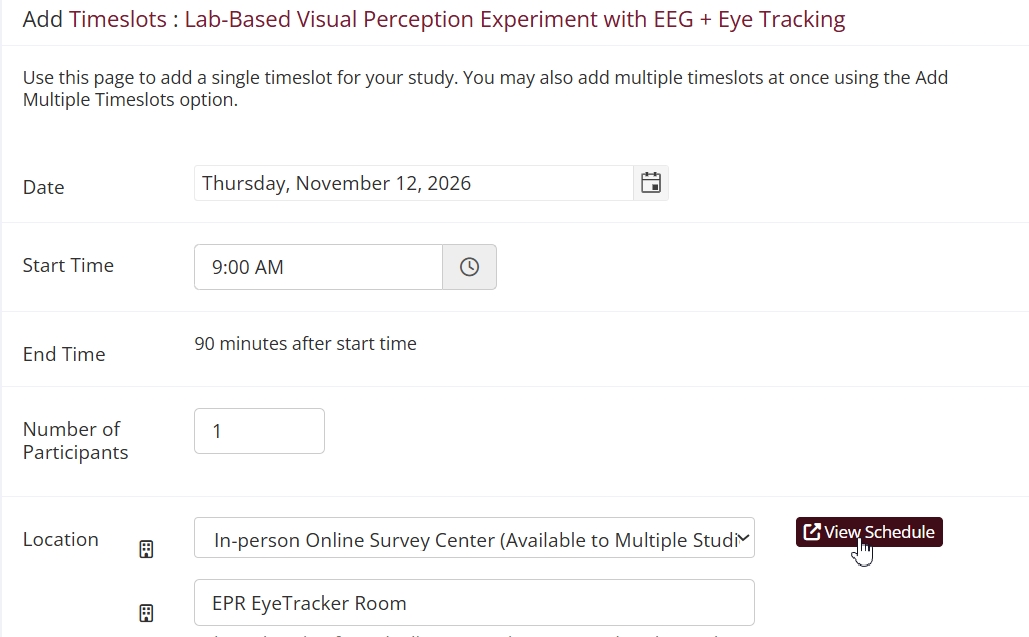
You can view the schedule for any location on the day selected by clicking on the View Schedule button when adding or editing timeslots:
This will open a pop-up view for location usage on that day:
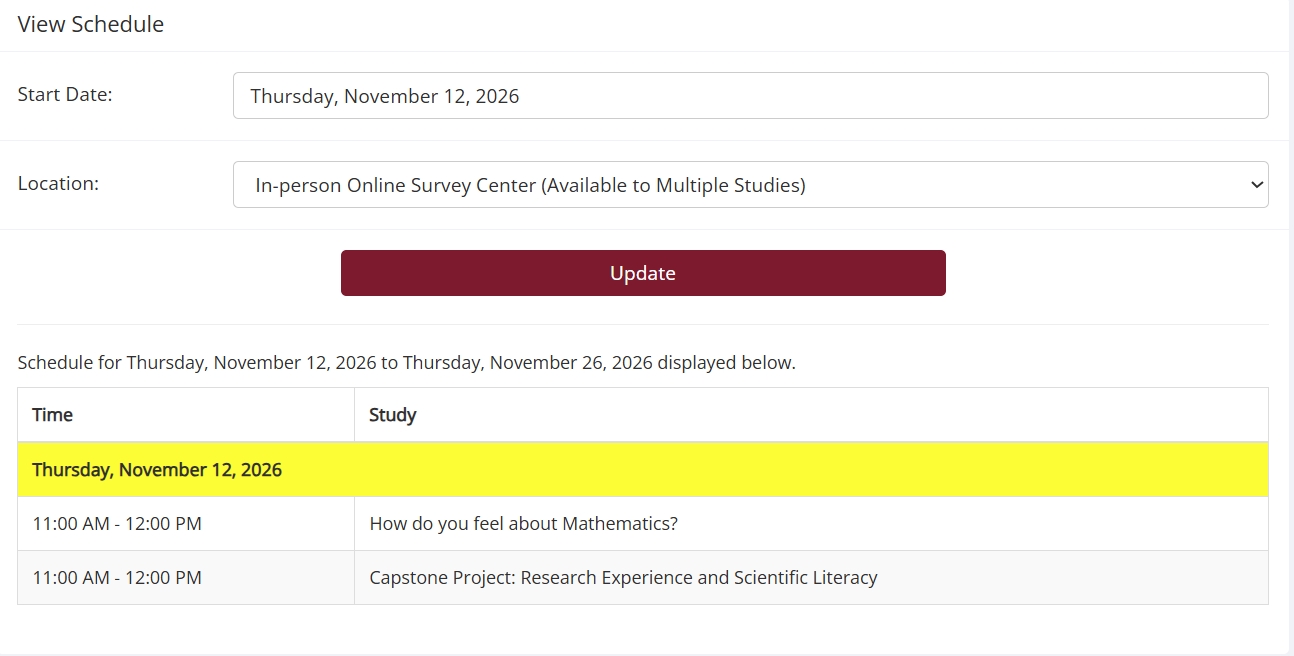
You can cycle through different locations using the dropdown menu. The menu will indicate which locations are shared locations:
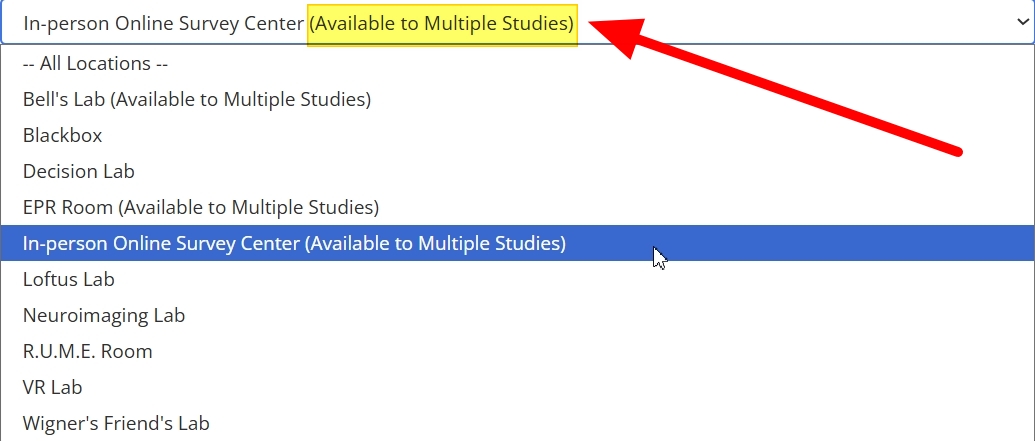
Those locations with the “Available to Multiple Studies” parenthetical are shared locations. Please note that simply selecting a different location won’t automatically show the schedule for that location. You need to click the update button first.
When researchers add a timeslot using a shared location, the View Schedule feature gives them the start and end times for any given day. This makes it much easier for researchers to coordinate usage of shared location. Remember, in order for two researchers to add timeslots using the same shared location during the same time period, they have to 1) make sure they use the same start time and 2) make sure that their timeslot has the duration. The View Schedule tool makes this easy.
Other Tools
View Schedule isn’t the only tool that can help you make the most out of shared locations, but it is certainly a highly useful one. On the Generate Reports page, administrators can use Study Schedule to generate a report for a specific location or all locations. They can also set a start date and end date, then view the schedule for that date range.
Researchers do not have this option, but that doesn’t mean they are left without tools designed with researchers in mind. Researchers can easily make their study schedules available to other researchers using the Calendar Feed feature.
Closing Considerations
We’ve covered the basics of using shared locations and beyond. At this point, you should have a good grasp of what making a location a shared location entails. We’ve even thrown a quick introduction to using shared locations together with other scheduling tools for improved results.
We’d like to conclude with some advice that may be especially helpful to administrators or those in similar positions who understand the mechanics of shared locations, but for one reason or another still wonder whether to use this feature.
That’s ok. This feature deals with some more advanced aspects of scheduling. If you are concerned because it sounds like this feature would cause more problems for you than it would solve, and you think that you must not be getting it, let us reassure you. It could be that default approach to reserving locations (first researcher to reserve a location for a specific time gets it) works just fine. When researchers rarely have to compete over location usage, there may be little benefit to making any location a shared location.
That said, research, labs, and the institutes that support them are anything but stagnant. Situations change. The last takeaway we want you to have here is an understanding of what to have in the back of your mind should circumstances change. Maybe a new research group is added, or your department buys some new and highly sought-after equipment that only works in one room, or something else changes that necessitates a more “hands-on”, organized approach to allocating resources like locations.
If something like this happens, or your researchers start to complain about never getting the “good” locations at the best times, keep this option in mind.